
How to Support Wave Based Deployments with Omni Embedded Content
Embedding Omni dashboards, workbooks, or chatbots for multiple customers? Any single data model will affect all tenants unless you use a wave based deployment. Here's how to do that.


Intro
Not every customer can — or should — upgrade at the same time. Sales timelines, onboarding windows, contractual commitments and the state of the underlying data warehouse schema in a multi-tenant deployment mean your tenants might need to be on different versions of your analytics product simultaneously. A wave-based deployment strategy handles exactly this: promoting new versions to specific customers in controlled stages, while others stay pinned to what's already been validated. Here's how to implement that pattern in Omni.
01 - THE PROBLEM
The trouble with a single shared model
Omni makes it genuinely fast to build embedded analytics. You get a great semantic layer, solid embed SSO, and dynamic connection environments that handle multi-tenant data routing out of the box. The developer experience is legitimately good.
But once you’re running dashboards for multiple customers in production, a familiar problem emerges: any change to your shared data model is a change for every tenant at once. Rename a field, restructure a topic, refactor a join — and you’ve just updated dashboards and data dependencies across your entire customer base simultaneously.
What you actually want is something closer to how a multi-tenant deployment usually works: a versioned artifact that can be validated then selectively deployed to each tenant environment (deployment stage x tenant) when the time is right. Here’s how we built that on top of Omni’s API.
02 - THE DESIGN
The solution hinges on a single Omni model per data model and content version, with content from a previous model version exported, re-imported and then associated to the new model with updated content specifications – all hosted within a single Omni Instance. This would result in a single model and set of associated content per active model version (as opposed to a model per tenant x environment). API-driven workflows orchestrated by CI/CD would manage artifact creation within Omni. An Operations team would manage the mapping tenant environments and model / content versions as metadata within a transactional data store.
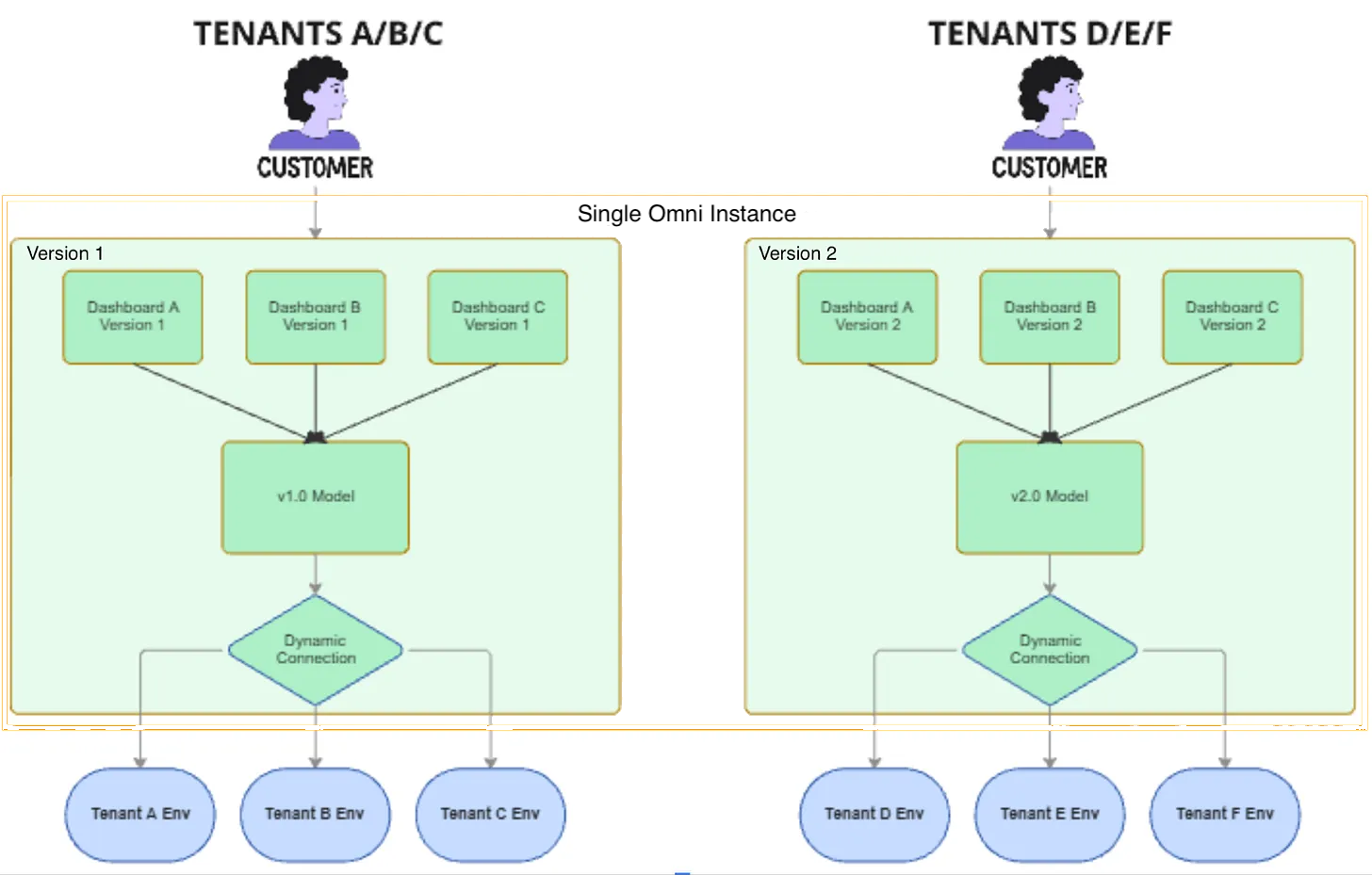
At runtime, content paths in the Omni iFrame URL would be dynamically resolved based on a database look-up, by the parent web application, to determine which version is associated with a given (deployment stage x tenant) for a specific user session.
The versioning design
The core idea is simple: treat each Omni data model as a versioned artifact, paired with its own set of dashboards, that can be promoted independently per tenant and environment.
A few key properties the design needs to satisfy:
→ Atomic promotion — model and dashboards deploy together as a unit
→ Tenant isolation — each tenant is pinned to a specific version until explicitly migrated
→ Fully scriptable — the entire lifecycle should be automatable via Omni’s API and CI/CD
→ Minimal footprint — only active versions are maintained; no accumulation of orphaned models
The good news: Omni’s API surface covers almost everything you need. You’ll use four areas — the Model API, the Content Migration API, Connection Environment APIs, and the Embed SSO API. Connection environment setup is a one-time prerequisite; the rest runs per deployment cycle.
Prerequisites: Before running any versioned deployments, configure your data warehouse dynamic connection environments once via
POST /api/v1/connection-environmentsand map yourenvironmentuser attribute values (tenant_a, tenant_b) to their respective data warehouse schemas. This wiring doesn’t change between versions.
03 - THE DATA MODEL
The two tables you need
The versioning logic lives in your application database, not in Omni. Two tables do the heavy lifting.
dashboard_model
Maps each Omni dashboard ID to a model version number. This gets populated automatically during the import step. The dashboard_slug is a stable logical name (like patient-summary) that your app uses to look up the right dashboard ID regardless of version.
CREATE TABLE dashboard_model (
  dashboard_id       UUID         NOT NULL,   -- returned by /documents/import
  model_version_id   INT          NOT NULL,
  dashboard_slug     VARCHAR      NOT NULL,   -- e.g. "patient-summary"
  created_at         TIMESTAMP    DEFAULT NOW()
  updated_at         TIMESTAMP    DEFAULT NOW()
);
tenant_version
Maps each tenant + environment pair to their active model version. This is the single row your app queries at session time to know which version — and therefore which dashboards — to serve.
CREATE TABLE tenant_version (
  tenant_id           VARCHAR     NOT NULL,
  tenant_environment  VARCHAR     NOT NULL,   -- "staging" | "production"
  model_version_id    INT         NOT NULL,
  updated_at          TIMESTAMP   DEFAULT NOW(),
  PRIMARY KEY (tenant_id, tenant_environment)
);
Promoting a tenant from staging to production is just an UPDATE on this table. That’s it.
04 - THE WORKFLOW
The deployment workflow
Here’s the full sequence for cutting Version N+1 from an existing Version N baseline. Steps 1–3 are model work; steps 4–8 are content; steps 9–10 are promotion.
Phases, Actions, Omni API Call
01. Model Copy
Check out the Omni model git repo, copy the Version N directory to Version N+1 with an auto-incremented name, push to mainline.
git + CI
02. Model Registration
Register the new model in Omni and capture the returned
model_idfor Version N+1.POST /api/v1/models
03. Model Edits
Add, update, or remove views, fields, and topics in the new model branch via YAML push.
POST /api/unstable/models/:id/yaml
04. Dashboard Export
Export all dashboards associated with Version N as JSON payloads. Each response includes the full dashboard, workbook model, and any spreadsheet tile data.
GET /api/unstable/documents/:id/export
05. Folder Creation
Create a new shared organization folder named
v{N+1}(e.g.v2) to house all imported dashboards for this version. Capture the returnedfolder_id.POST /api/v1/folders
06. Dashboard Import
Re-import each dashboard, substituting
baseModelIdwith the Version N+1 model ID and targeting thev{N+1}folder. Capture the returneddashboardIdvalues.POST /api/unstable/documents/import
07 Mapping Update
Write a row to
dashboard_modelfor each imported dashboard, linkingdashboard_idtomodel_version_id = N+1and its slug.App DB write
08. Tenant Staging — Upsert a row in
tenant_versionwithenvironment = "staging"andmodel_version_id = N+1for the tenant you’re validating.App DB write
09. Validation — QA the staging embed session. Confirm dashboards resolve to the correct IDs and queries route to the staging Snowflake schema.
Manual / automated
10. Production Promotion
Update
tenant_versiontoenvironment = "production"for each approved tenant. Other tenants remain on their existing version.App DB write
Steps 1–8 can be fully scripted and run in a CI pipeline. Steps 9 and 10 are naturally gated — you validate in staging before promoting to production, per tenant.
What the export/import looks like in practice
The Content Migration API is the workhorse here. Export a dashboard, swap the model reference, re-import. It’s less than 10 lines of curl:
# Step 4: Export from Version N
curl -L 'https://<org>.omniapp.co/api/unstable/documents/<dashboard_id>/export' \
  -H 'Authorization: Bearer <TOKEN>' \
  -o dashboard_export.json

# Step 5: Create the v{N+1} folder
curl -X POST 'https://<org>.omniapp.co/api/v1/folders' \
  -H 'Authorization: Bearer <TOKEN>' \
  -d '{"name": "v2", "scope": "organization"}'

# Step 6: Patch baseModelId and import into new folder
jq '.baseModelId = "<new_model_id>" | .folderId = "<folder_id>"' dashboard_export.json \
  | curl -X POST 'https://<org>.omniapp.co/api/unstable/documents/import' \
      -H 'Authorization: Bearer <TOKEN>' \
      -H 'Content-Type: application/json' \
      -d @-
The import response gives you the new dashboardId. Write that, the version number, and the slug to dashboard_model and you’re done with this dashboard.
05 - RUNTIME
Runtime content and data resolution
At session time, your embed layer does two lookups before generating the signed URL.
Step 1: Resolve the dashboard ID
Query your two tables to get the right contentPath for this tenant and environment:
SELECT dm.dashboard_id
FROM   tenant_version tv
JOIN   dashboard_model dm
       ON  dm.model_version_id = tv.model_version_id
      AND  dm.dashboard_slug   = 'patient-summary'
WHERE  tv.tenant_id          = 'acme-corp'
AND   tv.tenant_environment  = 'production';
Step 2: Generate the signed embed URL
Pass the resolved dashboard ID and inject environment and tenant_id as user attributes. Omni handles Snowflake routing from there — no additional application logic needed.
POST https://<org>.omniapp.co/embed/sso/generate-url
{
  "contentPath":  "/dashboards/<resolved_dashboard_id>",
  "externalId":   "acme-corp",
  "name":         "Acme Corp — Production",
  "userAttributes": {
    "environment":      "production",
    "tenant_id":        "acme-corp",
    "model_version":    "2"
  }
}
The environment attribute is what triggers Omni’s connection environment routing — queries go to the Snowflake schema you mapped during one-time setup. For deeper per-tenant data isolation within a schema, Omni’s dynamic_schemas model parameter scopes table references to a tenant-specific schema using the tenant_id attribute at query time.
06 - TRADE-OFFS
What works well and what to watch
Strengths
√ Atomic promotion — model and dashboards deploy as a single unit
√ Tenant isolation — other customers never see in-progress changes
√ Fully scriptable and CI/CD-compatible
√ All model changes enter git immediately
√ Small artifact footprint — only active versions maintained
Watch out for
→ User-created workbooks and dashboards break when their base version is deprecated — designate a stable mainline model for user defined content
→ Content migration endpoints are currently under /api/unstable — pin your API version and monitor Omni’s changelog
On API stability: The export and import endpoints (
/api/unstable/documents/...) are functional and actively used in production, but the/unstableprefix means the schema can change without a major version bump. Pin the API response structure in your migration scripts and add a smoke test that catches schema drift early.
The full design — including the complete table schemas, script specs, and open architectural questions — is available as an internal technical brief. If you’re working on a similar multi-tenant Omni deployment and want to compare notes, reach out.
Astrodata, Inc. We’re a data consultancy specializing in modern analytics infrastructure — Snowflake, Omni, dbt, and the connective tissue between them. We help teams build data products that actually ship.
astrodata.us