
When There's No Schema: Generating Synthetic Data from DBT YML Definitions
Greenfield dbt project? No data, no problem - here's how to use Claude to generate realistic synthetic data straight from your model definitions.

In our previous post, we showed how Snowflake’s native GENERATE_SYNTHETIC_DATA stored procedure can mirror a live production schema into a dev environment and, using existing data as a guide, generate synthetic data to match, safely and without exposing any PII or PHI. That approach requires one thing: an actual table with data in it to derive statistical distributions from.
> 📎 Previous post: Generating Synthetic Data in Snowflake
> Read it first for the full picture if you haven’t already - this post picks up where that one leaves off.
But what if you’re building something from scratch? No production database yet. No DDLs. Just a dbt project with model definitions defined in yml files. This is the reality of greenfield healthcare analytics projects - and it’s where Snowflake’s built-in tooling hits a wall.
This post covers that case specifically: using Claude as an LLM-powered code generator to read your dbt model definitions and produce a fully self-contained, Snowflake-compatible seed script from them.
Why This Case Is Different
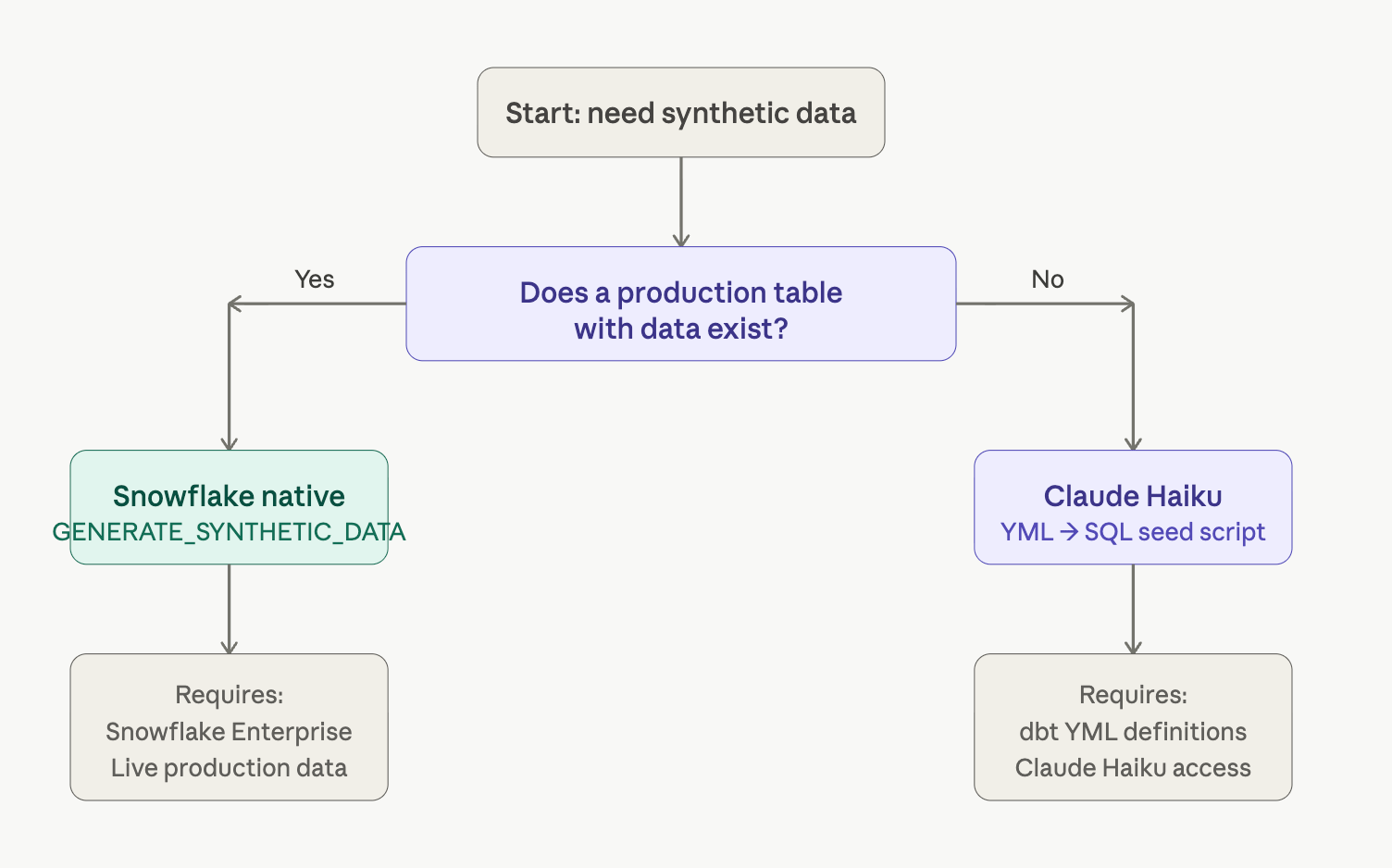
The typical synthetic data journey has a clear starting point: existing data. But greenfield projects - especially in healthcare, where you’re building a clinical consumption layer before production systems are live - seldom have data in the required shape for the apps being written. At this point in the project, the supporting schema lives entirely in the specification and its dbt definitions.
The standard use case: Production table exists → derive distributions → generate synthetic copy. Requires Snowflake Enterprise and live data.
This use case: YML model definition exists → LLM reads structure → generates plausible data in the form of INSERT statements. No existing data required.
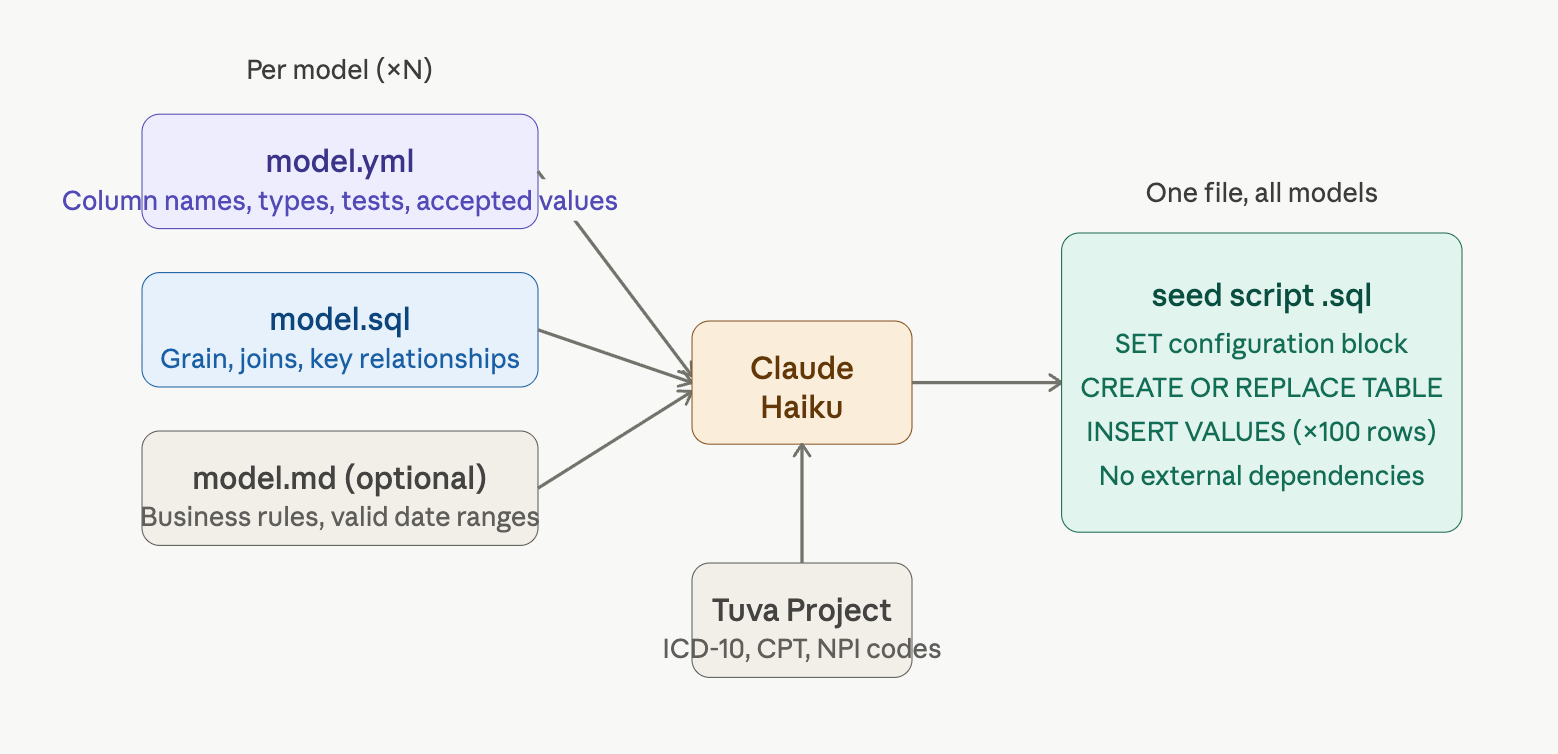
DBT model definitions, if defined, can be a remarkably rich source of truth. It describes column names, data types, accepted values, descriptions, and relationships between models - everything an LLM needs to produce realistic, referentially coherent synthetic data. For information not usually conveyed in these `yml` files, additional context can be provided in your llm system prompt.
Why Claude Haiku - Not Opus or Sonnet
This is the part that surprises most engineers: for this specific task, a smaller, cheaper model outperforms a larger one. Here’s why.
Claude Opus / Sonnet:
Context window fills quickly when reading many YML + SQL + MD files simultaneously
Responses are verbose - prose commentary, markdown, caveats - that need to be stripped before the SQL runs
Cost is 5–15× higher per token vs. Haiku
Speed is slower on large multi-file reads
Claude Haiku:
Fits many model files in a single context window
Returns terse, directive output - ideal for structured SQL generation
Dramatically lower cost per generation run (and you’ll run this many times during development)
Fast enough for interactive iteration
> ⚠️ Token session limits. Currently, Claude operates on a 5 hour rolling window with different token counts depending on your Anthropic tier.
An enterprise dbt project can easily contain many hundreds of model definitions, each with a YML, SQL, and MD file. Opus or Sonnet will likely hit context limits mid-generation forcing temporary token rate limits. Waiting 5 hours to resume one’s work is not acceptable.
Haiku’s throughput-to-cost ratio makes it the pragmatic choice when the deliverable is structured SQL, not prose.
What a dbt YML Gives Claude to Work With
A well-authored dbt model definition already encodes the schema contract. Claude reads it the same way a human would - column by column, noting types, accepted values, and relationships.
# models/mart/dim_patient.yml
version: 2

models:
  - name: dim_patient
    description: "One row per patient across all clinical encounters."
    columns:
      - name: patient_key
        description: "Surrogate key."
        tests: [unique, not_null]
      - name: patient_id
        description: "Source system patient identifier."
      - name: gender_code
        description: "HL7 administrative gender."
        tests:
          - accepted_values:
              values: ['M', 'F', 'U']
      - name: birth_date
        description: "Patient date of birth."
From this alone, Claude can infer: surrogate key pattern, accepted categorical values, date format requirements, referential constraints (when one model’s key appears in another’s fact table), and a realistic distribution of values appropriate for a clinical context.
When a healthcare coding context is needed - ICD-10 codes, SNOMED, CPT codes, NPI numbers - the system prompt directs Claude to pull from The Tuva Project’s synthetic data, a purpose-built open source reference dataset for healthcare analytics.
The System Prompt, Annotated
Here is a representative system prompt for the task at hand broken into design decisions. Each design decision is intentional.
1 - Scope & model ordering
-- Focus on models in this order:
--   dim_* → fact_* → agg_* → rpt_*
-- (sv_* excluded)
The ordering matters. Dimension tables must be generated before fact tables so that foreign key values can be drawn from a consistent pool - otherwise referential integrity breaks. The sv_* exclusion tag <ignore>) keeps service layer views out of scope without complicating the prompt.
2 - File awareness
-- Each model has up to 3 files:
--   .sql  → the select logic
--   .yml  → the model definition (100% adherence required)
--   .md   → optional extended descriptions
Declaring all three file types up front prevents Claude from ignoring the Markdown documentation, which often carries business rules that don’t appear in the YML column list - things like valid date ranges for a clinical encounter or the expected grain of a fact table.
3 - External code reference
-- Healthcare codes can be fetched from:
-- https://github.com/tuva-health/demo
Rather than asking Claude to hallucinate ICD-10 or CPT codes (which it confidently will), the prompt anchors it to an accurate external source. The Tuva Project’s demo data contains realistic code distributions that pass clinical validation.
4 - The deliverable spec
-- Deliverable: a 100% Snowflake-compatible SQL script
-- No external dependencies
-- Saved to: scripts/synthetic_{model_name}__{timestamp}.sql
-- Configuration block at top:

SET target_database = ‘_database_value_here_’; -- e.g. ‘dev’
SET target_schema   = ‘_target_schema_value_here_’; -- e.g. ‘clinical’
USE DATABASE IDENTIFIER($target_database);
CREATE OR REPLACE SCHEMA IDENTIFIER($target_schema);
USE SCHEMA IDENTIFIER($target_schema);
The configuration block at the top is the key reusability feature. The same generated script can be run against dev, qa, or any other target without editing the body of the script - just set the variables at runtime.
5 - Built-in self-review
-- After generation:
--   1. Review for SQL syntax errors
--   2. Review for Snowflake compatibility
--   3. Fix in-place before returning
Asking Claude to review its own output before returning it catches the majority of common generation errors - mismatched parentheses, ANSI SQL constructs that Snowflake doesn’t support, invalid date literals - without requiring a separate validation pass from the engineer.
The Generation Flow
01 - Claude reads the model directory
All .yml, .sql, and .md files under models/mart/ are loaded into context. Haiku’s throughput handles hundreds of model files without hitting the ceiling that would halt Opus mid-generation.
02 - Dimensions generated first
dim_* tables are produced first with surrogate keys and realistic value pools. These become the foreign key reference set for all subsequent fact tables.
03 - Facts, aggregates, and reports
fact_* rows reference the dimension keys generated in step 2. agg_* and rpt_* tables are derived at the appropriate grain - daily, monthly, or per-encounter as described in the YML.
04 - Self-review & Snowflake hardening
Before saving, Claude re-reads the generated SQL and corrects syntax errors and non-Snowflake constructs (e.g. ISNULL → IFNULL).
05 - Script saved with timestamped name
Output lands at scripts/synthetic_dim_patient_20260501T143200.sql - ready to run, portable across environments.
What the Output Looks Like
-- ── CONFIGURATION ────────────────────────────────────────────
SET target_database = ‘dev’;
SET target_schema   = ‘clinical’;
USE DATABASE IDENTIFIER($target_database);
CREATE OR REPLACE SCHEMA IDENTIFIER($target_schema);
USE SCHEMA IDENTIFIER($target_schema);

-- ── DIM_PATIENT ──────────────────────────────────────────────
CREATE OR REPLACE TABLE dim_patient (
    patient_key    VARCHAR(36),
    patient_id     VARCHAR(20),
    gender_code    VARCHAR(1),
    birth_date     DATE
);

INSERT INTO dim_patient VALUES
    (’a1b2c3d4-e5f6-...’, ‘PAT-10001’, ‘F’, ‘1978-03-14’),
    (’e5f6g7h8-i9j0-...’, ‘PAT-10002’, ‘M’, ‘1954-11-29’),
    -- ... 98 more rows
;

-- ── FACT_ENCOUNTER ────────────────────────────────────────────
CREATE OR REPLACE TABLE fact_encounter (
    encounter_key  VARCHAR(36),
    patient_key    VARCHAR(36),   -- FK → dim_patient
    encounter_date DATE,
    encounter_type VARCHAR(50),
    icd10_dx_code  VARCHAR(10)
);

-- INSERT rows reference patient_key values from dim_patient above
> ✅ Key property: The script is entirely self-contained. No CTEs referencing other queries, no external file dependencies, no dbt runtime required. Drop it into a Snowflake worksheet, update the two SET variables at the top, and run.
Known Limitations
Claude cannot guarantee referential integrity across complex many-to-many relationships without explicit guidance in the prompt. Add join key semantics to your YML descriptions if precision matters.
Healthcare codes (ICD-10, CPT, SNOMED) should always be anchored to a reference source like Tuva - free-generated codes will look plausible but will fail clinical validation.
The self-review step catches most Snowflake compatibility issues but not all - a quick
SHOW ERRORSpass after first run is still good practice.This approach generates static seed data. It is not a substitute for a proper data generation pipeline in environments that need ongoing, fresh synthetic data at volume.
When to Use Which Approach
Use this post’s approach (YML → Claude Haiku → SQL) when:
You’re on a greenfield project with no existing tables
dbt models are defined before the database exists
You need dev seed data quickly
You need healthcare or domain-specific codes
Use the previous post’s approach (Prod table → `GENERATE_SYNTHETIC_DATA`) when:
Production data exists with real distributions
Statistical fidelity is required
Snowflake Enterprise is available
PII/PHI masking is the primary goal
📈 Next Steps / Service Offer
If your organization needs a custom synthetic data pipeline - handling larger schemas, bespoke data types, domain-specific code libraries, or automated CI/CD integration - our team can:
Design a Claude-powered generation workflow that runs as part of your dbt project setup
Build prompts tuned to your specific model naming conventions and YML standards
Extend the approach to non-Snowflake targets (BigQuery, Databricks, Redshift)
Provide ongoing support for compliance audits and data masking policies
Thanks for reading! Subscribe for free to receive new posts and support my work.